
Share article
Categorization (or, if you prefer, labeling) of surveys is one of the key things you will need to do when working with customer (but also employee) experience. At the same time, it is an activity that takes the most time. On the other hand, it is very important to have feedback properly sorted so that it can be worked with effectively.
InsightSofa addresses this using AI survey labeling. Labeling is lightning fast, requires no human work, and is incredibly accurate.
How does AI labeling work?
Each company is different and requires different categorization. Therefore, InsightSofa provides a place where you can prepare the labels yourself as needed. Labels can be organized hierarchically. This means you can use several levels of labels. Each label should represent one of the categories into which you want to divide the feedback.

By this, you define the categories (labels) into which the surveys will be classified. InsightSofa AI goes through all feedback (including all questions, answers, open-ended comments, etc.) and examines whether any of the created labels characterize the given survey. If so, it assigns the label to the survey.
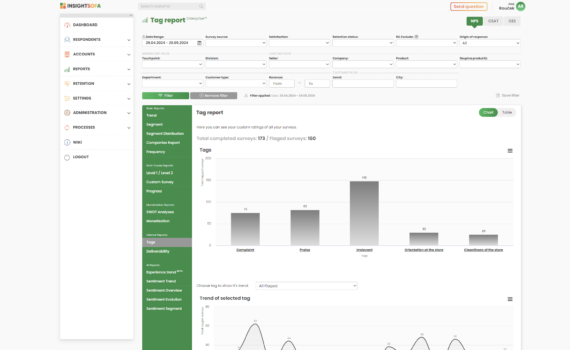
InsightSofa AI can assign multiple labels (if it makes logical sense). If it assigns a sub-label, it automatically adds the parent label to the survey as well. The result of this sophisticated activity is then the Survey Labeling Report (below):

In this report, you have all collected reports categorized into topics (labels) that you have defined yourself. Because the labels are multi-level, you can expand the column and access the second-level categorization (which provides you with even more precise data).
Like every other report, this one also has a tabular view available. This serves you for working with exact data (numbers), or for exporting the results to Excel and working with them further outside of InsightSofa.